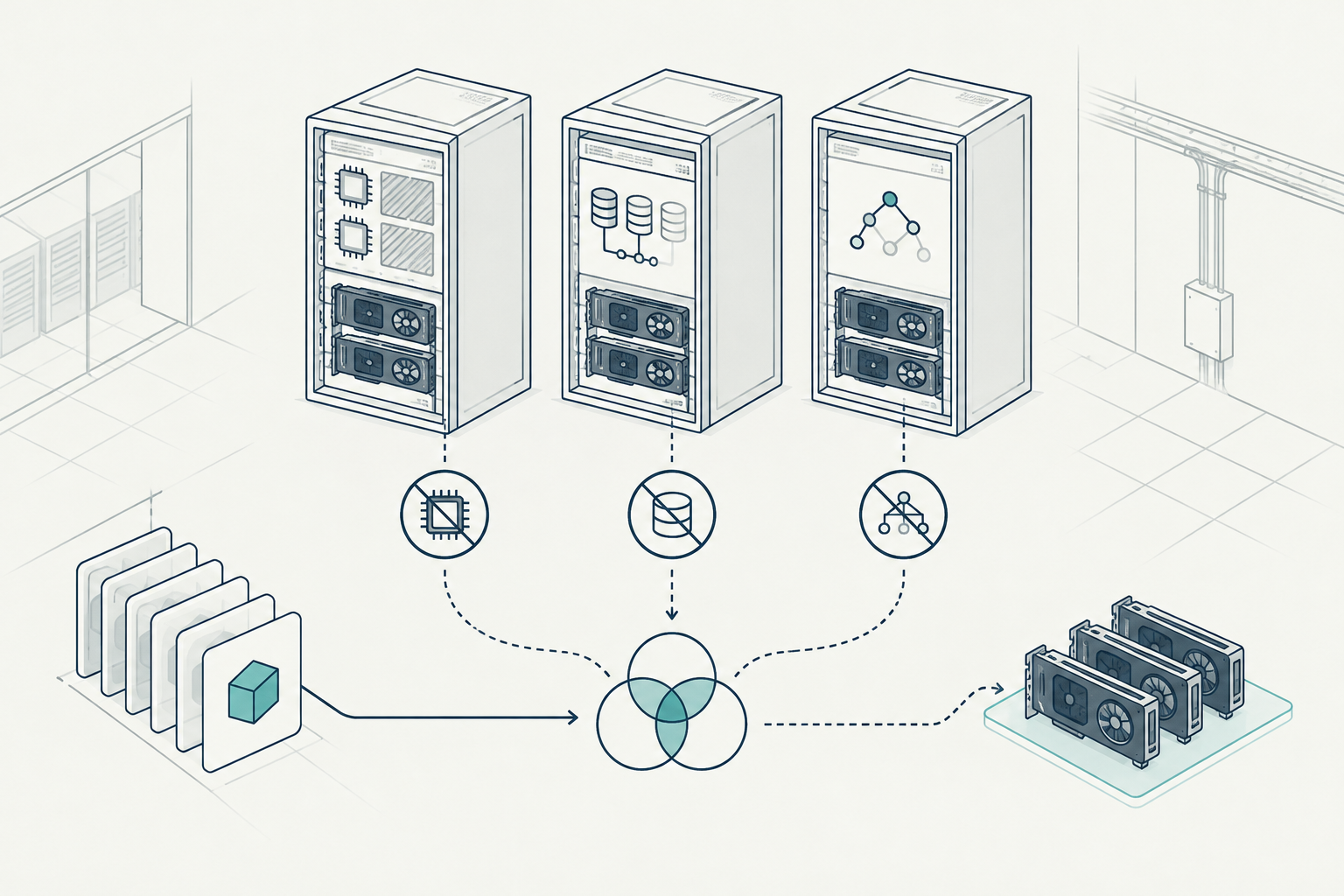
Spare GPUs are not necessarily usable capacity
Polyaxon's technical walkthrough dated October 28, 2026 examines a hypothetical GPU pod blocked by the combined constraints of GPU placement, CPU reservations and storage topology. Its operational lesson is specific: a cluster can have unused accelerators while offering no node on which a particular workload can legally run. The useful change in troubleshooting perspective is from counting available GPUs to testing complete placement eligibility.
For operators, that distinction changes the next action. Buying another accelerator will not fix a pod whose persistent volume is tied to the wrong node, whose CPU request exceeds remaining reservations, or whose placement rules exclude the available hardware. Investigating each constraint separately is necessary; proving that they overlap on at least one node is decisive.
This matters for smaller GCC and MENA private-cloud estates, where a few GPU servers may serve development, inference and batch processing together. An accelerator can remain idle while its host is unavailable to a workload. The estate still carries acquisition, power, cooling and support costs, even though the intended job cannot start.
The connection to rFactorial's Clastiq Orchestrator is architectural. Its documented scope covers private-cloud orchestration across compute, GPU, storage and networks. Those are related placement concerns, not independent procurement categories. This article describes a Kubernetes operating workflow; it does not assume Clastiq provides any particular diagnostic command, integration or automatic remediation.
Start with the scheduling evidence
First establish what Pending means for this pod. Kubernetes uses that phase while a pod is waiting for scheduling or while containers are being prepared. A pod already assigned to a node but waiting on an image, volume mount or device initialization needs a different investigation from one the scheduler cannot place.
Capture the pod specification, scheduling condition and recent events before changing configuration. Record the namespace, workload owner, time submitted and intended GPU allocation. Repeated edits can otherwise erase the practical trail of what blocked the original request.
kubectl get pod -n ai inference-worker -o wide
kubectl describe pod -n ai inference-worker
kubectl get pod -n ai inference-worker -o yaml
kubectl get nodes -L kubernetes.io/hostname,topology.kubernetes.io/zone
kubectl describe nodes
kubectl get pvc -n ai
kubectl get pv
kubectl get storageclass
These commands are a starting point, not a complete cluster audit. Use appropriately scoped access, and keep exported specifications within approved operational channels: they may expose internal names, image locations and storage details.
If the pod has no assigned node, read its FailedScheduling events. Summaries such as insufficient CPU, insufficient GPU resources, affinity mismatch or volume node-affinity conflict describe rejection reasons across candidate nodes. They do not necessarily describe one common problem on every server.
If a node is already assigned, inspect container waiting reasons and volume events instead. Do not spend an hour changing scheduler affinity to fix a mount failure that happens after scheduling.
Build the intersection node by node
The scheduler needs a node satisfying all applicable requirements simultaneously. Start with the nodes that could supply the requested accelerator resource, then test CPU, memory, placement rules, taints, storage and other scheduling constraints against each candidate.
Use allocatable resources and existing requests, rather than dashboard utilization alone. A CPU that is currently quiet may already be reserved by another pod. Similarly, a physically installed GPU may not be advertised to Kubernetes, or its advertised resource may already be allocated.
For the requested GPU resource, inspect the exact name and quantity. A conventional whole-device request, a partition-specific resource and a sharing configuration are not interchangeable. Determine what the node actually advertises before interpreting the count as physical devices or isolated capacity.
A small eligibility sheet often explains more than a cluster-wide capacity chart:
| Candidate | GPU request fits | CPU request fits | Placement allowed | Volume accessible | Result |
|---|---|---|---|---|---|
| Node A | Yes | No | Yes | Yes | CPU blocked |
| Node B | Yes | Yes | Yes | No | Storage blocked |
| Node C | Yes | Yes | No | No | Policy and storage blocked |
Treat this as a working record. Add memory, pod affinity, topology spread or other filters when relevant. The aim is not an exhaustive spreadsheet for every incident; it is a defensible explanation of why no candidate survives.
Also check that nodes are Ready and schedulable. A cordoned server or an untolerated taint can make apparently free capacity irrelevant. Preserve intentional maintenance and security boundaries rather than deleting them to make the table turn green.
An illustrative three-node investigation
Consider an illustrative private-cloud estate with three servers, each advertising two whole-GPU resources. Each server has 32 allocatable vCPUs. Assume sufficient memory, healthy devices and no additional scheduling restrictions beyond those listed below. These numbers are hypothetical, not product benchmarks.
Node A has one GPU allocated and one free. Existing pod requests reserve 26 vCPUs, leaving six unreserved. Node B also has one GPU allocated and one free, with 20 vCPUs reserved and 12 unreserved. Node C has two free GPUs and 24 unreserved vCPUs.
A new pod requests one GPU and eight vCPUs. Its placement policy permits only Nodes A and B. Its bound local persistent volume has node affinity to Node A.
The estate therefore has four unallocated GPUs out of six. Nevertheless, Node A fails because six available vCPUs cannot satisfy an eight-vCPU request. Node B passes GPU, CPU and placement checks but cannot use the local volume. Node C passes the resource checks but fails both placement and volume eligibility.
Adding a GPU to Node B changes nothing for this pod. Adding one to Node A also changes nothing: the CPU reservation remains the blocker.
Suppose an approved four-vCPU, CPU-only service can move from Node A to Node C. After a controlled relocation, Node A's reservations fall from 26 to 22 vCPUs, leaving ten available. The GPU pod can then reserve eight, taking total CPU requests to 30 and GPU allocations to two. Node C's CPU reservations rise from eight to 12, still within its 32-vCPU allowance.
That resolves the illustrated intersection without buying hardware. It is not universally safe: service disruption, placement policy and capacity headroom still require review. Simply deleting the service pod would not guarantee that its controller places the replacement elsewhere.
For a cost lens, assume an internal planning allocation of $18 per GPU-day. Four unallocated GPUs represent $72 of daily capacity allocation. If all remain stranded for five days, that is $360 of allocation against unused capacity. It is not an incremental electricity bill or guaranteed cash saving. Track recovered workload output separately from this accounting estimate.
Correct CPU requests without creating contention
CPU reservations are a frequent source of confusion because utilization and scheduling operate on different evidence. A monitoring graph can show low CPU activity while existing requests leave insufficient schedulable capacity.
Review requests against representative workload measurements, including initialization, data loading and concurrent activity. A GPU process may spend little CPU during steady inference but need substantial preprocessing capacity during bursts. Lowering its request solely to pass scheduling can replace Pending time with degraded throughput.
Changing a CPU limit alone does not release a request already accounted for by the scheduler. Likewise, changing the number of application workers without revisiting the pod specification may leave reservations unchanged.
Choose among measured request right-sizing, controlled relocation, workload rescheduling or additional host capacity. Record who approved the change and define a rollback trigger such as sustained latency deterioration or CPU contention.
Priority and preemption need similar care. They may help when lower-priority workloads hold resources on an otherwise eligible node. They cannot make an inaccessible local volume available or make incompatible hardware satisfy a requirement.
Resolve storage topology before moving data
Storage is not merely a readiness check after GPU selection. A bound volume can determine where a pod is allowed to run. Inspect the claim, its bound persistent volume, volume node affinity, access modes and the storage class's binding mode.
Local storage creates an obvious placement boundary: data on one server does not automatically follow a pod to another. Other storage arrangements can also impose topology or attachment restrictions. Avoid assuming that a shared-looking namespace means every GPU node can mount every volume.
For supported provisioning workflows, a StorageClass using WaitForFirstConsumer can delay binding or provisioning until workload placement constraints are considered. That can prevent some premature topology decisions. It does not relocate an already bound local volume or remove the storage system's underlying restrictions.
If data movement is the remedy, treat it as a controlled migration. Confirm copy duration, consistency requirements, downtime, backup and rollback. Do not edit volume node affinity to claim that data exists somewhere it does not.
For smaller GCC/MENA estates, a single server may hold both a scarce accelerator and the only fast local dataset copy. Document that dependency before promising failover or maintenance flexibility. Regional location requirements and organizational data policies must remain intact during any migration.
Network reachability also needs validation before production use. Successful scheduling alone does not prove that storage, registries or application dependencies are reachable with the required performance and access controls.
Sharing does not remove the other filters
Operators searching for Kubernetes GPU sharing with hard limits should distinguish allocation counts from enforceable isolation. Time slicing, Multi-Instance GPU and Multi-Process Service address different execution arrangements; none inherently fixes CPU reservations or storage topology.
Time slicing allows supported configurations to expose shared access to a GPU. Advertised replicas should not be interpreted as additional physical devices, guaranteed equal compute shares or hard GPU-memory partitions. More schedulable GPU access can still produce contention and out-of-memory failures.
MIG, on supported hardware, divides a GPU into predefined instances with hardware-backed partitioning of resources. The workload must fit an available profile, and the cluster must advertise the corresponding resource. Free capacity in the wrong profile may still be unusable for the request.
MPS supports concurrent CUDA processes and offers resource controls in supported configurations. Its limits and isolation characteristics depend on the deployment. Do not equate it with MIG's hardware partitioning or assume every Kubernetes stack implements the same controls.
Namespace quotas can govern how many advertised GPU resources a team requests. They do not, by themselves, enforce a memory boundary inside a time-sliced device. For hard limits, specify exactly what must be bounded: GPU memory, compute access, concurrency or tenant exposure. Then validate the chosen mechanism under representative contention.
Clastiq Lite's verified role is bringing self-service AI and GPU sharing to teams. That statement does not establish a particular sharing implementation or isolation guarantee. Confirm those details against documentation and deployment requirements. Use Clastiq's in-depth guidance for further infrastructure evaluation rather than treating sharing as a universal scheduling repair.
Make orchestration an operating discipline
Clastiq Orchestrator, part of Cognition-AI's rFactorial product family, is relevant because its documented orchestration scope spans compute, GPU, storage and networks. A practical evaluation should therefore use a workload with real placement and data dependencies, not just demonstrate that an empty cluster can launch a GPU container.
Bring the node eligibility sheet, resource requests, storage map and policy requirements into that evaluation. Ask how operators establish the required configuration and review changes. Separate documented product capabilities from requirements that still need demonstration or operational procedures.
For rack-level planning, consult Clastiq's local-inference rack guide. Use it alongside workload-specific checks; neither a rack plan nor a GPU inventory substitutes for proving that the intended pod can reach its data on an eligible host.
Governance should distinguish workload ownership from infrastructure authority. Application teams can explain minimum CPU and GPU needs; platform operators control node policy and capacity; data owners approve movement and access. Exceptions should have owners, expiry dates and rollback instructions.
Cognition-AI is based in Muscat, Oman, but this operating problem is global. Its regional significance is practical: smaller estates often have fewer interchangeable nodes, making each storage or placement restriction more consequential.
Measure usable capacity, not just inventory
Track Pending duration from submission to scheduling, with causes classified from incident evidence. Keep post-scheduling startup delays separate so that image downloads and volume mounts do not distort scheduler measurements.
Measure GPU allocation and actual device activity separately. An allocated GPU can still be idle, while shared-device activity can hide poor per-workload performance. Pair infrastructure readings with completed jobs, inference latency or another workload outcome.
After a corrective change, compare scheduling delay, CPU contention, storage behavior and useful output over a representative period. In the illustrative example, the immediate success is one newly feasible placement. Higher throughput or lower cost per job requires measurement; it cannot be inferred from the pod becoming Running.
What to do this week
- Capture one Pending GPU pod's specification, scheduling condition and events before making changes.
- Build a node-by-node eligibility sheet covering the exact GPU resource, CPU requests, placement rules and volume topology.
- Test one approved remedy with a rollback plan; do not weaken isolation or falsify storage affinity.
- Define sharing requirements explicitly, including memory boundaries, contention tolerance and quota ownership.
- Baseline scheduling delay, GPU allocation, device activity and useful output before authorizing additional accelerators.
Evaluate Clastiq Orchestrator against these cross-resource requirements within the rFactorial product family. For deployment discussions, contact info@cognitionai.cloud with the workload constraints and eligibility evidence, not just the installed GPU count.